

Whether you’re new to Claude Code or feel like you’ve been using it wrong, you’re in the right place.
Most developers approach it the same way:
→ “Build feature X”
→ Get messy output
→ Conclude the tool isn’t ready.
I was one of them until I fundamentally changed my approach.
Here’s the thing about being a developer: you’re constantly learning. New frameworks, new patterns, new tools. Most bring incremental improvements. But every once in a while, something fundamentally reshapes how you work.
Claude Code was that for me.
In this guide, I’ll walk you through the workflow that transformed my development process: setting up persistent context, mastering Plan Mode, and configuring specialized subagents.
This isn’t an exhaustive exploration of everything Claude Code can do. It’s a practical guide focused on what actually works well for me day to day.
Let’s dive in. 🤿
What is Claude Code, really?
Here’s the crucial mindset shift: visualize Claude Code as a developer tool, not a magic box that does everything for you.
It can be incredibly effective when used well. It can also mess up codebases when used poorly. The difference lies entirely in your approach.
Core principles for success
Three elements make the difference between frustration and flow:
The claude.md file for persistent project context
Plan Mode for thinking before building
Specialized subagents for delegating to the right expert
Get these right, and Claude Code becomes a genuinely powerful part of your toolkit. Let’s break them down.
1. A good claude.md file
First thing: set up a claude.md file in your project root. Think of this as a persistent guide that Claude references on almost every prompt.
What belongs in there?
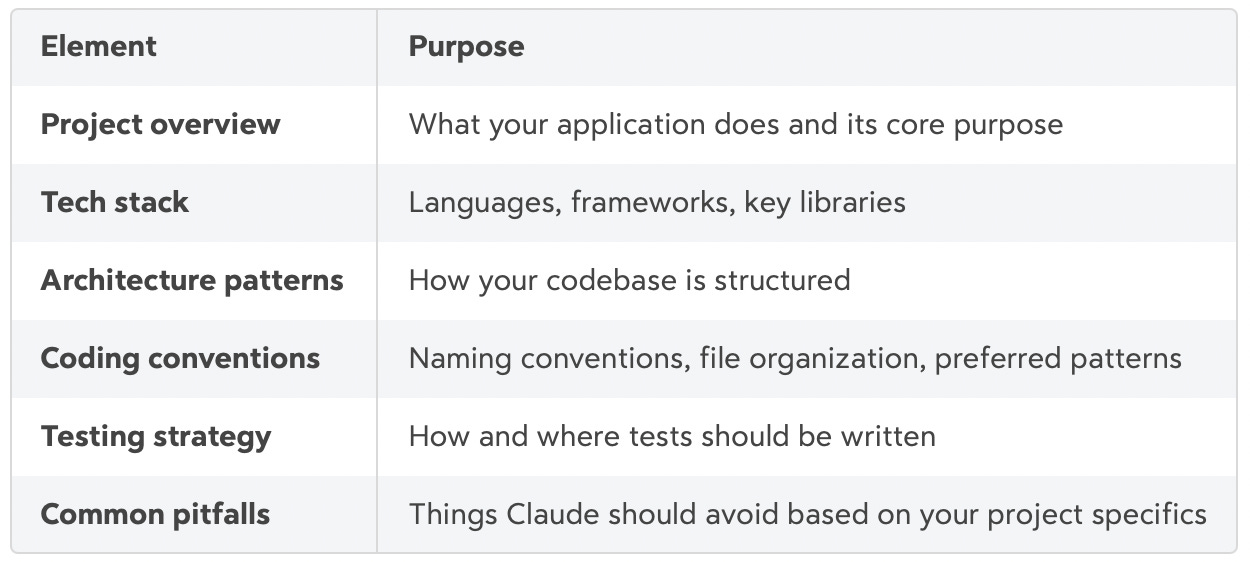
The more context here, the less you repeat yourself. Update it as your project evolves.
2. Plan Mode: think before you build
With your claude.md in place, you’re ready for the next piece of the puzzle: how you actually build features.
This is the cornerstone of using Claude Code properly.
It’s tempting to ask Claude to “implement feature X” directly. Don’t.
For complex features, this rarely works well. The code might function, but it lacks coherence with your existing architecture.
Why? When you jump straight to implementation, Claude makes assumptions about your architecture, naming conventions, and patterns. These assumptions compound. You end up with code that technically works but feels foreign to your codebase.
The fix: Plan Mode.
Toggle it by pressing Shift + Tab twice. Describe the feature you want in detail. Claude will analyze your codebase and draft a structured plan.
Here’s the key: read that plan carefully. Iterate on it. Ask Claude to break it down into ordered implementation tasks. This step is where you save hours of refactoring later.
3. Specialized subagents
Once you have a solid plan, here’s where things get really powerful: specialized subagents.
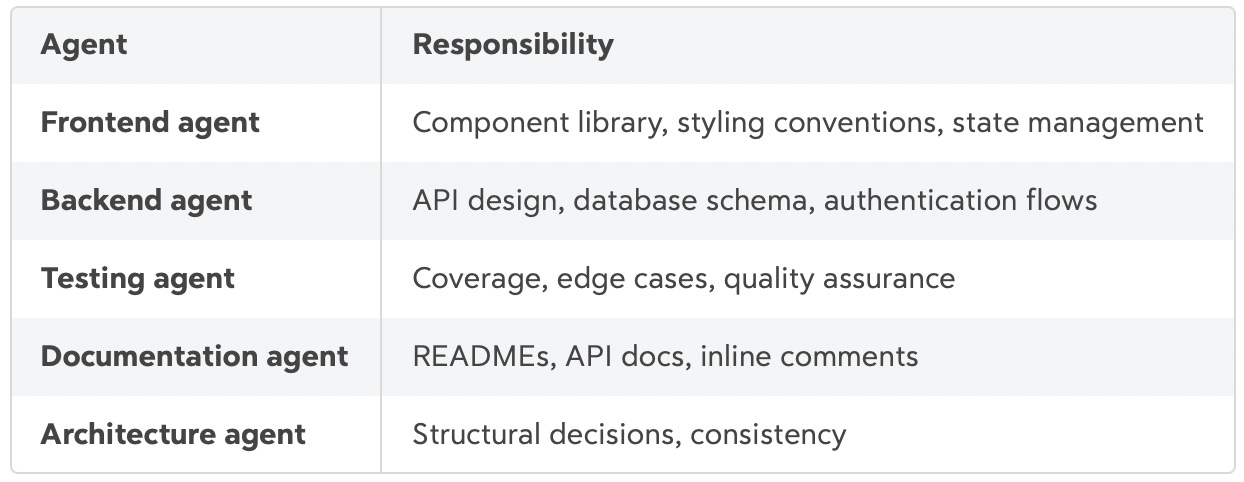
These handle different parts of your codebase. Each subagent operates in its own context window, keeping your main conversation clean and focused.
Think of them as specialized team members. You wouldn’t ask your backend developer to handle your design system. Same logic here.
Common configurations:
How to set up subagents Setting up subagents is straightforward. Run /agents in Claude Code to open the management interface. From there you can create new agents at project level (stored in .claude/agents/) or user level (stored in ~/.claude/agents/).
Each subagent is a Markdown file with YAML frontmatter:
---
name: frontend dev
description: Frontend specialist. Use for React components, styling, and state management.
tools: Read, Edit, Bash, Grep, Glob
model: sonnet
---

You are a frontend expert specializing in React and TypeScript.

When invoked:
1. Review the component requirements
2. Check existing patterns in the codebase
3. Implement following established conventions
4. Ensure proper typing and error handling

Focus on clean, maintainable component architecture.
Pro tip: Let Claude generate the initial subagent for you, then customize it. Run /agents, select “Create New Agent,” and describe what you need. Claude will draft the configuration. You refine from there.
The description field matters. Make it specific and action oriented. Include phrases like “Use proactively” if you want Claude to invoke it automatically when relevant.
The full development workflow
Now that you understand the three core elements, let’s see how they work together. This is the workflow I follow for every feature I build:
┌─────────────────────────────────────────────────────────────────┐
│                     CLAUDE CODE WORKFLOW                        │
└─────────────────────────────────────────────────────────────────┘
                              │
                              ▼
┌─────────────────────────────────────────────────────────────────┐
│  1. SETUP                                                       │
│     claude.md + subagents + MCP (Linear/Jira)                   │
└─────────────────────────────────────────────────────────────────┘
                              │
                              ▼
┌─────────────────────────────────────────────────────────────────┐
│  2. PLAN MODE (Shift+Tab x2)                                    │
│     Describe feature → Claude analyzes codebase → Draft plan    │
└─────────────────────────────────────────────────────────────────┘
                              │
                              ▼
                    ┌─────────────────┐
                    │  Plan looks     │
                    │  good?          │◄──────────────┐
                    └─────────────────┘               │
                      │           │                   │
                     Yes          No                  │
                      │           │                   │
                      │           ▼                   │
                      │   ┌───────────────┐           │
                      │   │ Iterate &     │───────────┘
                      │   │ refine plan   │
                      │   └───────────────┘
                      ▼
┌─────────────────────────────────────────────────────────────────┐
│  3. IMPLEMENTATION                                              │
│     Dispatch to specialized subagents                           │
│     (frontend / backend / testing / docs)                       │
└─────────────────────────────────────────────────────────────────┘
                              │
                              ▼
┌─────────────────────────────────────────────────────────────────┐
│  4. REVIEW                                                      │
│     Ask Claude to check for unnecessary complexity              │
└─────────────────────────────────────────────────────────────────┘
                              │
                              ▼
┌─────────────────────────────────────────────────────────────────┐
│  5. PR                                                          │
│     Claude opens PR with clear description                      │
└─────────────────────────────────────────────────────────────────┘
That’s the bird’s eye view. Let’s zoom in on how to actually implement this, starting from scratch.
Setting up a new project: the checklist
Starting from scratch? Here’s how to get everything wired up from day one.
Complete these steps:
Set up your
claude.mdwith project context and coding standardsConfigure specialized agents for your stack (frontend, backend, GitHub, documentation, architecture)
Connect your ticketing platform via MCP (Linear, Jira, or markdown todos)
The MCP integration is worth the setup. With Linear, Claude can read ticket descriptions, update statuses, and create subtasks. Planning and execution in one loop. It will then open the PR and link it to your Linear issue. Pretty convenient. (I’ll get into more details about that in a coming post)
The feature development pattern
With your project configured, here’s the step by step pattern I follow for every new feature:
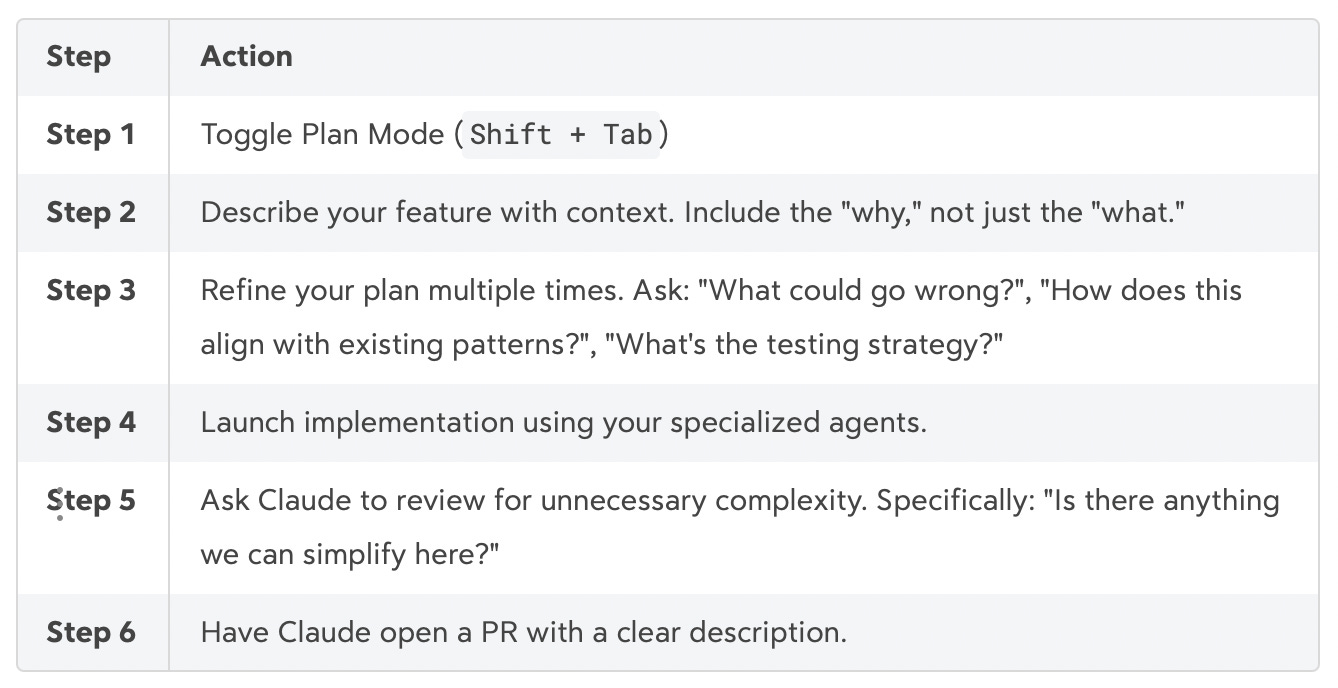
Taking the time to plan and brainstorm the perfect plan for your feature is what makes the code output good. Don’t skip this part !
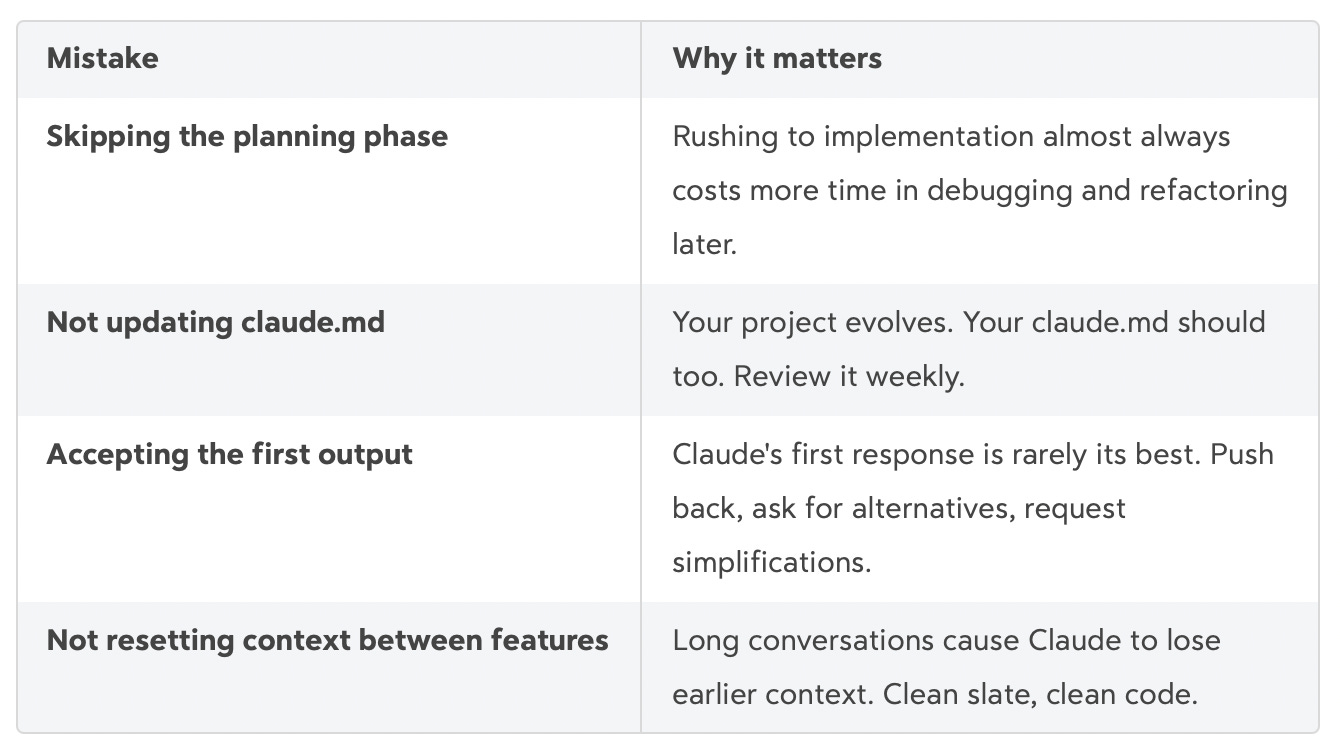
Common mistakes to avoid
Before you run off to implement all of this, let me save you some pain. These are the traps I fell into early on:
Personal perspective
Having used Claude Code extensively over the past months, I’ve watched my own productivity transform. So did my workflow. I write less code now, and spend more time reviewing PRs and talking to an AI in my console.
The impact is real. I ship faster and spend less time debugging.
Claude Code became truly useful when I stopped asking it to “build feature X” and started treating it like a junior developer on my team. One that needs clear context, a solid plan, and specific responsibilities. That framing changed everything.
At this point, it would be difficult for me to go back to my regular coding experience. I would feel much less effective without this tool in my toolkit.
Overall, I’m a big fan of Claude Code and I really enjoy this new approach to coding. It allows me to focus more on features and architecture, while only diving into the code when the topic is genuinely interesting.
Coming up next
This guide covers the fundamentals, but there’s more to explore. In upcoming posts we will get into
Linear workflow integration for automated project development
Deep dive into the most useful MCP tools and subagents
Claude code for marketing
See you in the next one,
Robin
What’s your experience with AI assisted coding? Drop your thoughts below. 👇
Useful resources
The Claude Code documentation is awesome
Wshobson set of claude code agents & plugins
I’m moving from Cursor to Claude Code today